
Photo booth without Wi-Fi: why it’s essential for your event
You have booked a stunning barn in Burgundy for your wedding. The caterer is sorted, the DJ is ready, the photo booth is set up. And then… nothing works. The venue’s Wi-Fi is too weak, the photo booth can’t print, and your guests are left waiting in front of a screen that just keeps loading. A nightmare scenario? Yet it happens regularly with photo booths that depend on Wi-Fi.
Contents
- Wi-Fi, the number 1 photo booth trap
- How does a photo booth work without Wi-Fi?
- Venues where Wi-Fi is a problem
- What happens to the photos without internet?
- FAQ
Wi-Fi, the number 1 photo booth trap
Most photo booths on the market need an internet connection to work. Why? Because they send photos to a cloud server in real time, because the printer communicates over the network, or because the app itself requires a connection.
The problem is that events almost never take place somewhere with reliable Wi-Fi.
What we see in the field
We haven’t audited the network at every venue, so there’s no made-up percentage here. But after several hundred events equipped, the finding is always the same:
- Most venues have no usable Wi-Fi: barns, châteaux, wine estates, village halls and gardens rarely have coverage that reaches the spot where the booth is set up.
- When Wi-Fi does exist, it gets overloaded. A router designed for a holiday cottage’s reception area can’t cope with several dozen guests connected at once, especially when everyone posts at the same moment.
- A stable connection all evening is the exception, and you only find out once you’re there, on the day, when it’s too late to change supplier.
If your photo booth depends on Wi-Fi, you are adding a point of failure you don’t control: neither the venue’s network, nor the number of guests connecting to it at the same time. That’s not an acceptable risk for a wedding or a corporate party, where the entertainment happens only once and can’t be done again.
A real testimonial
“We’d hired a photo booth from a competitor for our wedding at a château in the Dordogne. The château’s Wi-Fi didn’t reach the reception room. The result: the booth never printed a single photo all evening. We paid €600 for nothing.” - Sophie and Marc, married in September 2025
It’s exactly this kind of situation that led us to design the Badabooth to work without any internet connection at all.
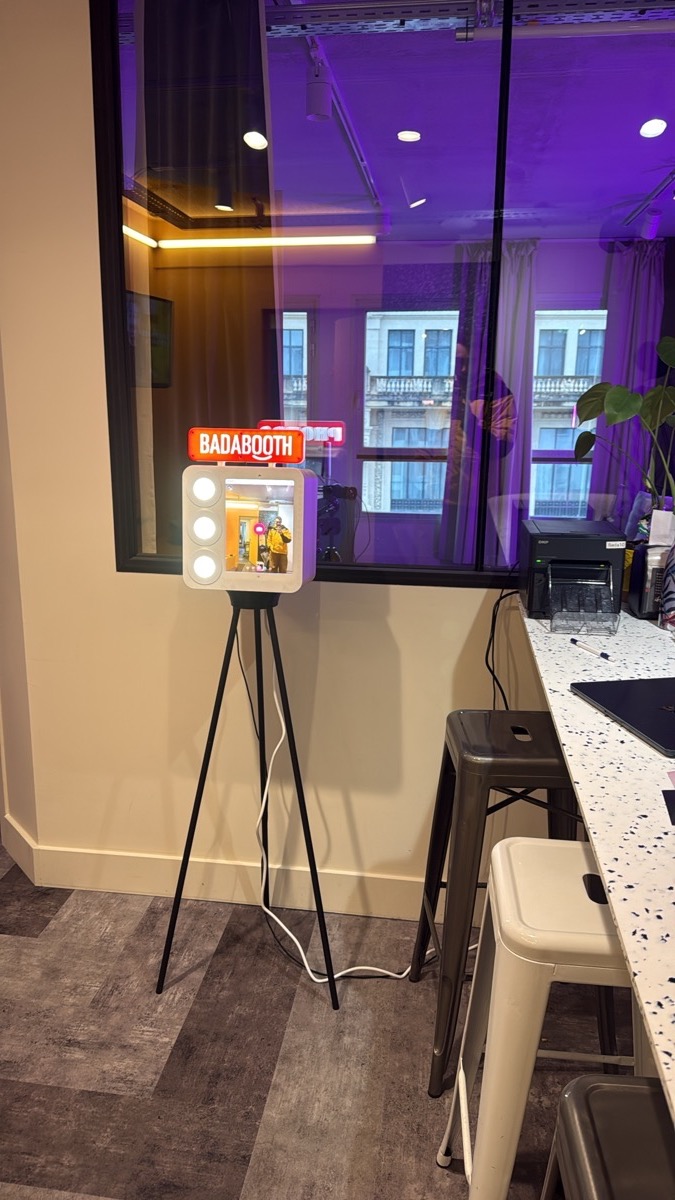
How does a photo booth work without Wi-Fi?
The Badabooth uses a technical set-up that completely removes the need for Wi-Fi:
Direct booth-to-printer communication
The iPad and the printer talk to each other directly via a USB cable (for the DNP QW410 and DS620 printers) or via a local network created by the printer (for the Canon SELPHY). No internet router, no cloud server, no Wi-Fi relay needed.
Local printing
Photos are processed and sent to the printer locally, without going through the internet. Printing takes 8 to 15 seconds depending on the printer, the same time as with a fibre connection.
Local photo storage
All photos and GIFs are stored on the iPad during the event. Afterwards, once you’re back home (with Wi-Fi), the app automatically uploads all the photos to Google Drive and sends you the link.
Your digital photos, even without internet
The booth works without Wi-Fi and without internet: during the event, photos are printed and stored locally on the iPad. Your guests leave with their paper print on the spot, even in the middle of a field. The digital version of all the photos is then sent via a download link after the event.
Looking for a standalone photo booth? Discover our packages from €99 (+€30 delivery). No Wi-Fi needed.
Venues where Wi-Fi is a problem
Here are the types of venue where a photo booth without Wi-Fi is absolutely essential:
| Type of venue | Wi-Fi problem | Badabooth solution |
|---|---|---|
| Converted barn | No Wi-Fi, thick walls | Works without Wi-Fi |
| Château | Stone walls, weak Wi-Fi | Works without Wi-Fi |
| Wine estate | Rural area, no fibre | Works without Wi-Fi |
| Village hall | Basic Wi-Fi, overloaded | Works without Wi-Fi |
| Outdoors (gazebo, garden) | No Wi-Fi | Works without Wi-Fi |
| Barge / boat | Unstable connection | Works without Wi-Fi |
| Restaurant | Wi-Fi reserved for customers | Works without Wi-Fi |
| Hotel | Shared, slow Wi-Fi | Works without Wi-Fi |
For weddings in Burgundy, in Provence or at the Loire Valley châteaux, working without Wi-Fi is a deciding factor.
See also our article on how to set up a photo booth easily and our guide to the photo booth without an attendant.
Ruddy Morel, founder of Badabooth: “Wi-Fi is the number 1 point of failure for photo booths. When I designed the Badabooth, my very first decision was to remove any dependence on Wi-Fi entirely. That’s what sets us apart from 90% of competitors.”
What happens to the photos without internet?
Lots of people worry: “If the photo booth works without internet, how do I get my photos back?”
Here’s how it works:
-
During the event: photos are printed instantly and stored on the iPad. Your guests leave with their paper print (the digital photos stay stored locally, without internet).
-
After the event: back home, you connect the iPad to Wi-Fi. The app automatically uploads all the photos and GIFs to Google Drive.
-
The next day: you receive a Google Drive link with all the photos in high quality. You share it with your guests.
No photo is lost. Wi-Fi is only needed after the event, when you have all the time in the world.
A photo booth that works every single time? Book your Badabooth from €99 (+€30 delivery). Zero Wi-Fi required, zero stress.
Ruddy Morel, founder of Badabooth: “After more than 1,000 events, what strikes me is that the technology changes but the result is always the same: fits of laughter, memories and photos you find years later on the fridge. That’s the real value of a photo booth.”
FAQ
Can a photo booth really work without Wi-Fi?
Yes. The Badabooth works completely independently. The tablet and the printer communicate directly via USB cable. Photos are printed locally, without going through the internet. All you need is a power socket.
How do my guests get their photos without internet?
Your guests leave with their paper print on the day. The digital version of all the photos is sent via a download link after the event: the photos are saved locally on the iPad during the event, then uploaded once you’re back with Wi-Fi.
Does the photo booth print just as fast without Wi-Fi?
Yes, exactly the same speed. Printing is local (direct cable), so it doesn’t depend on the internet connection. 8 to 15 seconds per photo depending on the printer.
What if I don’t even have a power socket?
The external battery option (€60) lets the Badabooth run for around 4 hours without a power socket. Ideal for outdoor events.
Do animated GIFs also work without Wi-Fi?
Yes! GIFs are created locally on the iPad, without an internet connection. They are then sent via the download link after the event.